





Table of Contents
📌 Key Takeaways
- eCommerce app development has become an important channel for businesses looking to deliver faster, personalized, and mobile-first shopping experiences.
- The right eCommerce app development features should be selected based on the business model, target customers, operational needs, and growth plans.
- A scalable eCommerce app development process covers discovery, planning, UI/UX design, technology selection, development, testing, deployment, and maintenance.
- eCommerce app development cost and time vary significantly based on platform selection, feature complexity, integrations, backend architecture, security, and scalability requirements.
- Businesses should choose an experienced eCommerce app development company that can build secure, scalable solutions while supporting long-term growth, integrations, and continuous improvements.
eCommerce App Development Market at a Glance
| Metric | Current figure |
| Global retail eCommerce sales, 2025 | $6.42 trillion |
| Projected global retail eCommerce sales, 2028 | $7.89 trillion |
| eCommerce share of global retail, 2025 | 20.5% |
| Estimated global mobile commerce revenue, 2025 | $2.5 trillion |
| Mobile commerce share of retail eCommerce | ~63% |
| Smartphone share of retail website visits, 2025 | ~80% |
These figures explain why mobile-first commerce is no longer limited to large marketplaces. Smaller retailers and specialised brands can also use applications to create direct, personalised shopping experiences.
What is eCommerce App Development and How Does It Work?
eCommerce app development is the process of designing, building, testing, deploying, and maintaining a mobile application that allows customers to discover, compare, purchase, and manage products or services digitally.
Unlike a basic shopping website, a mobile application can use device capabilities such as:
- Push notifications
- Biometrics
- GPS and location services
- Camera and barcode scanning
- Mobile wallets
- Deep linking
- Personalized recommendations
- In-app customer support
- Device-level secure storage
The objective is not simply to put a website inside an app. Effective eCommerce application development creates a shopping experience designed specifically for mobile users.
For example, a fashion retailer may focus on repeat ordering, delivery slots, subscriptions, and location-based fulfillment.
Key Business Benefits of Building an eCommerce App
The growth of mobile shopping provides a strong commercial reason to invest in an app. In 2025, smartphones generated nearly 80% of retail website visits worldwide, according to Statista.
This creates an important opportunity for businesses that can convert mobile traffic into repeat customers.
Key benefits include:
1. Direct customer engagement:
Push notifications allow brands to communicate directly with customers without relying entirely on search or social platforms.
2. Personalization:
Browsing history, purchase behaviour, preferences, and wishlists can be used to personalize product discovery.
3. Faster shopping:
Saved addresses, payment methods, preferences, and one-tap checkout can reduce friction.
4. Higher retention:
Loyalty programmes, personalized offers, subscriptions, and rewards can encourage repeat purchases.
5. Better data:
First-party customer data can help businesses understand shopping behaviour and improve merchandising.
6. Omnichannel commerce:
An app can connect physical stores, websites, marketplaces, warehouses, loyalty programmes, and customer service.
For businesses with a large mobile customer base, eCommerce mobile application development can therefore support both revenue generation and customer retention.
What are the Different Types of eCommerce Apps to Build?
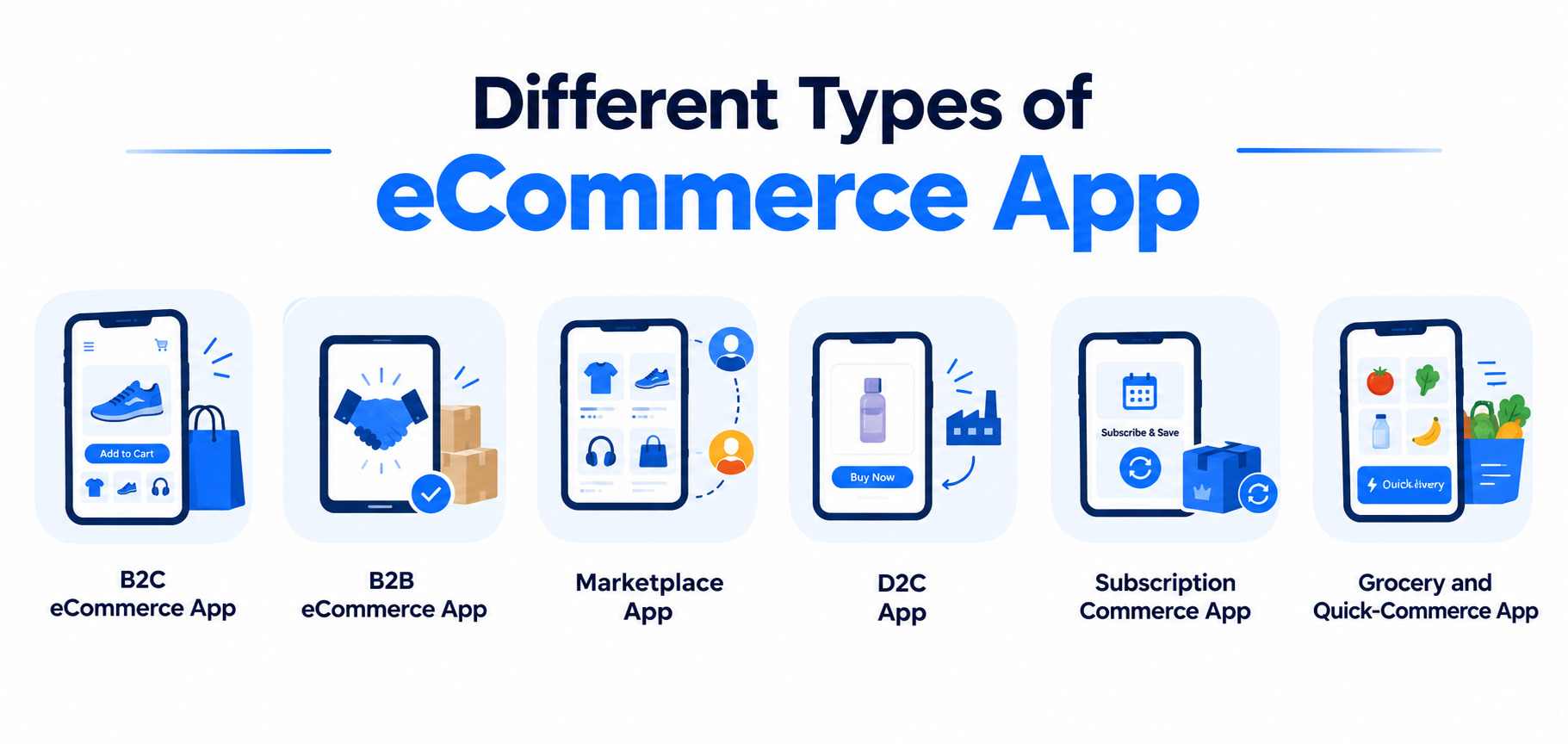
The business model determines much of the application’s architecture and functionality.
1. B2C eCommerce App
Businesses sell products directly to individual consumers through the app. The focus is typically on easy browsing, personalized shopping, secure payments, and fast checkout.
2. B2B eCommerce App
Businesses sell products or services to other businesses, often involving larger and recurring orders. Features such as bulk ordering, negotiated pricing, purchase approvals, invoicing, and credit management are commonly required.
3. Marketplace App
The platform connects multiple sellers with customers while managing transactions, commissions, and marketplace operations. Seller onboarding, verification, product management, payouts, and seller analytics are essential to support the multi-vendor ecosystem.
4. D2C App
Brands or manufacturers sell directly to customers without depending heavily on third-party marketplaces. The app gives businesses greater control over customer relationships, branding, pricing, promotions, and the overall buying experience.
5. Subscription Commerce App
Customers pay on a recurring basis to receive products or services at scheduled intervals. The app needs subscription management, recurring payments, plan changes, renewals, cancellations, and customer notifications.
6. Grocery and Quick-Commerce App
These apps support fast purchasing and fulfillment, often with real-time inventory and location-based delivery. They typically require delivery tracking, warehouse or store integration, route management, and fulfillment systems to process orders efficiently.
Some commerce businesses may also combine eCommerce functionality with On-Demand App Development, particularly when customers need to order products or services and receive them within a defined delivery window. Grocery delivery, food retail, beauty products, pharmacy, and other convenience-focused models can benefit from real-time order tracking, location services, delivery management, and automated notifications.
Which Essential Features Should an eCommerce App Include?
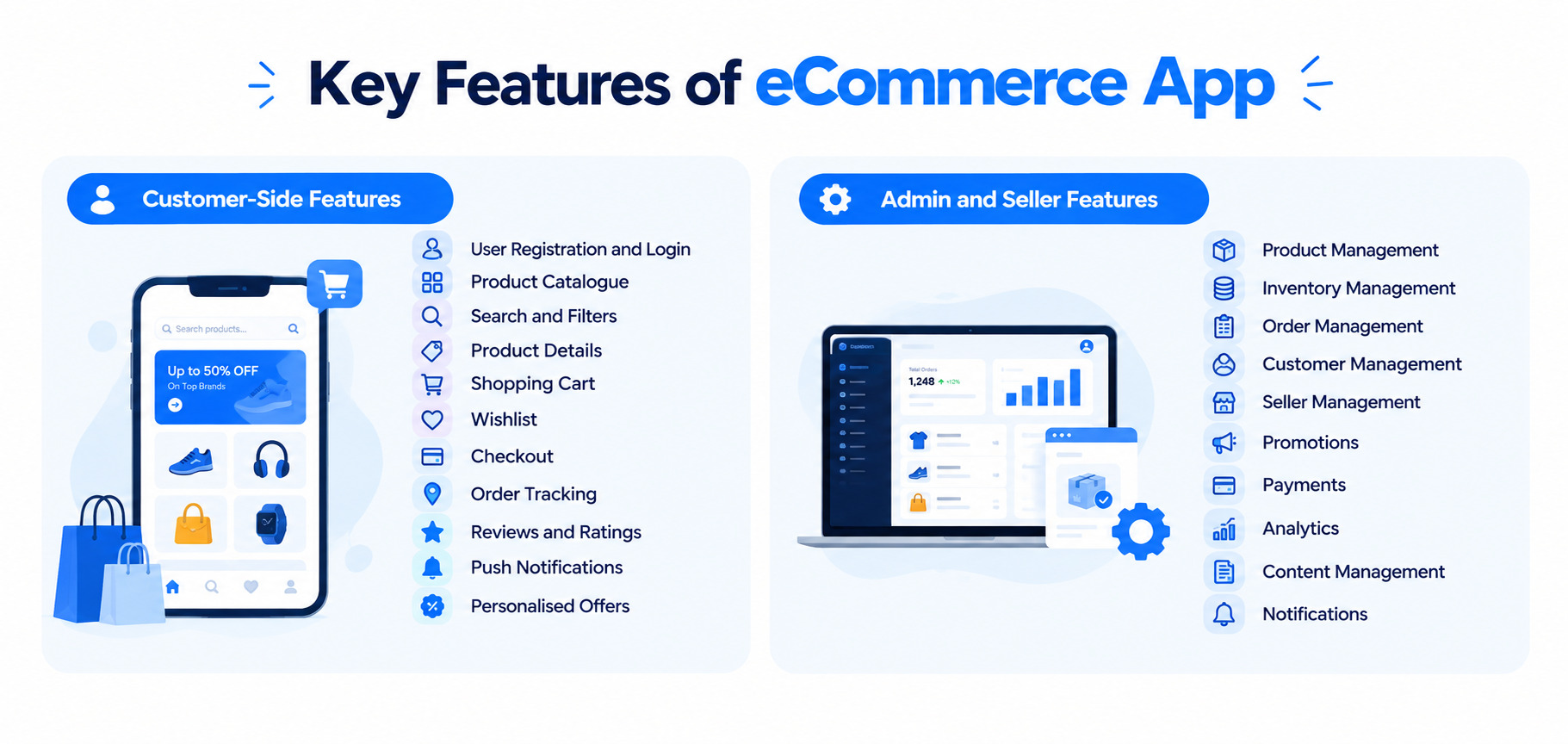
The right eCommerce app development features depend on the business model, product catalogue, target audience, and operational requirements, but a comprehensive application usually includes functionality across several layers.
Customer-Side Features
1. User Registration and Login:
Allows customers to securely create accounts and sign in using email, phone, OTP, social accounts, or supported biometric authentication.
2. Product Catalogue:
Displays products with images, videos, descriptions, specifications, prices, discounts, availability, variations, and related products.
3. Search and Filters:
Helps users quickly find products using keywords, categories, brands, price ranges, ratings, attributes, and availability.
4. Product Details:
Gives customers the decision-stage information they need before buying full specifications, size/variant guides, customer reviews and ratings, delivery estimates, and return or warranty policies.
5. Shopping Cart:
Lets customers manage selected products, update quantities, apply coupons, review charges, and choose delivery options before checkout.
6. Wishlist:
Enables customers to save products they may want to purchase later and supports personalised engagement and remarketing.
7. Checkout:
Provides a streamlined process for selecting an address, choosing a delivery option and payment method, reviewing the order, and confirming the purchase.
8. Order Tracking:
Gives customers real-time visibility into their order status from placement and confirmation through packing, shipping, delivery, and completion.
9. Reviews and Ratings:
Allows customers to share product feedback and ratings while helping other shoppers make informed purchasing decisions.
10. Push Notifications:
Keeps customers informed about orders, promotions, new products, abandoned carts, and back-in-stock items.
11. Personalised Offers:
Uses customer preferences, browsing behaviour, and purchase history to deliver relevant product recommendations, discounts, and promotions.
Admin and Seller Features
Customer-facing features are only one part of eCommerce app development solutions.
An admin panel may provide:
1. Product Management:
Allows admins to add, edit, categorise, organise, and remove products from the platform.
2. Inventory Management:
Helps monitor stock levels, product availability, and inventory changes across the business.
3. Order Management:
Enables admins to view, process, update, and manage customer orders throughout the fulfilment cycle.
4. Customer Management:
Provides tools to manage customer accounts, profiles, order history, and account activity.
5. Seller Management:
Allows marketplace admins to onboard, verify, monitor, and manage sellers and their activities.
6. Promotions:
Enables businesses to create and manage discounts, coupons, promotional campaigns, and special offers.
7. Payments:
Helps monitor transactions, payment statuses, refunds, commissions, and other financial activities.
8. Analytics:
Provides insights into sales, revenue, customer behaviour, product performance, and business trends.
9. Content Management:
Allows admins to manage banners, promotional content, product highlights, and other in-app content.
10. Notifications:
Enables targeted messages and alerts for customers or sellers about orders, offers, updates, and important activities.
For marketplace apps, a seller dashboard can additionally provide tools for managing inventory, pricing, orders, shipping, commissions, and payouts from a central interface.
Which Advanced Features Can Take Your eCommerce App to the Next Level?
Once the core shopping experience is stable, advanced capabilities can be introduced to improve discovery, engagement, and conversion.
- AI-Powered Recommendations:
Uses customer behaviour, preferences, and purchase history to suggest relevant products and create more personalised shopping experiences.
- AI Shopping Assistants:
Conversational AI helps customers find and compare products, understand specifications, receive recommendations, track orders, and get quick answers.
- Visual Search:
Allows customers to upload an image and discover visually similar products without needing to describe the item using keywords.
- Voice Search:
Enables customers to search for products using voice commands, making product discovery faster and more convenient on mobile devices.
- Augmented Reality:
Lets customers virtually visualise products in their surroundings or on themselves before purchasing, helping reduce uncertainty.
- Personalised Pricing and Promotions:
Uses customer preferences and shopping behaviour to deliver relevant offers, discounts, and promotions while following applicable pricing policies and regulations.
How Can You Protect an eCommerce App from Security Risks?
Security should be built into the eCommerce app from the beginning, particularly when the platform handles payments, personal information, and order data. Key security measures include:
- PCI-DSS Compliant Payment Processing:
Payment systems should follow PCI-DSS requirements to protect cardholder and transaction data. Using secure payment gateways also reduces the need to store sensitive card information within the app.
- End-to-End Encryption:
Data should be encrypted while it is transferred between users, apps, and servers, as well as when it is stored. This helps prevent unauthorised access to customer and business information.
- Secure Authentication:
OTPs, biometric authentication, multi-factor authentication, and secure token-based sessions can help prevent unauthorized account access. Session controls should also automatically expire inactive or compromised sessions.
Fraud detection tools can monitor transactions and account activity for unusual behaviour, such as suspicious pur
- Fraud Detection:
chases or repeated payment attempts. Automated alerts and risk scoring can help businesses respond to potential fraud quickly.
- Security Audits and Penetration Testing:
Regular security audits and penetration tests can identify vulnerabilities before they are exploited. Testing should be carried out before major releases and repeated as the application, infrastructure, and integrations evolve.
- Data Protection Compliance:
eCommerce apps should comply with applicable data protection regulations, such as the UAE PDPL and GDPR when serving customers in the European Union. Compliance should cover data collection, storage, processing, access, retention, and deletion.
Which Technology Stack Is Best for eCommerce App Development?
The technology stack should be selected based on application complexity, performance requirements, development budget, team expertise, and future scalability.
The technology stack should be selected based on application complexity, performance requirements, development budget, team expertise, and future scalability. For businesses targeting Android users, Android App Development can be approached using Kotlin or other suitable technologies depending on the application’s requirements.
A typical eCommerce app development technology stack may include:
| Layer | Technologies |
| iOS | Swift |
| Android | Kotlin |
| Cross-platform | Flutter, React Native |
| Frontend web | React.js, Next.js |
| Backend | Node.js, Python, .NET |
| Databases | PostgreSQL, MongoDB |
| Cloud | AWS, Google Cloud, Azure |
| Cache | Redis |
| Search | Elasticsearch/OpenSearch |
| APIs | REST, GraphQL |
| Analytics | Firebase, GA4 and other analytics platforms |
| AI/ML | Python, TensorFlow, PyTorch |
| DevOps | Docker, CI/CD, Kubernetes where required |
For Apple devices, iOS App Development typically uses Swift and Apple’s native development frameworks, while cross-platform technologies such as Flutter and React Native can support both major mobile platforms from a shared codebase. The final choice should depend on performance requirements, device coverage, development resources, and the desired user experience.
What Is the Step-by-Step Process for eCommerce App Development?
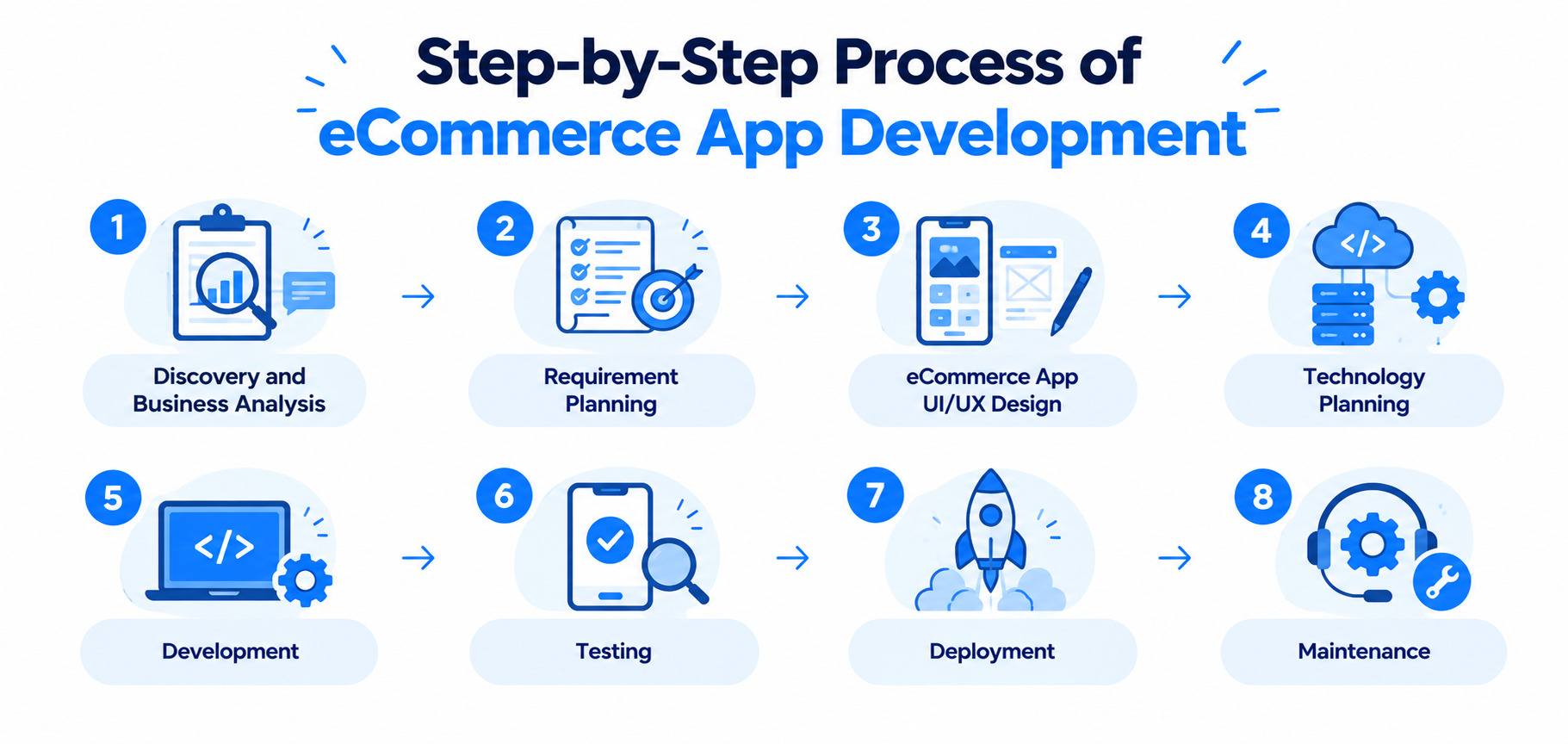
A structured eCommerce app development process usually includes the following stages.
Step 1: Discovery and Business Analysis
The team identifies business objectives, target users, competitors, revenue models, product categories, platforms, integrations, and technical needs. This creates a clear foundation for the eCommerce app and aligns development with business goals.
Step 2: Requirement Planning
Functional and non-functional requirements are documented based on the business and user needs. This defines the initial project scope, priorities, and MVP requirements.
Step 3: eCommerce App UI/UX Design
Designers create user flows, wireframes, prototypes, visual designs, and design systems for the app. Usability testing can validate the experience and identify improvements before development starts.
Step 4: Technology Planning
The team selects the application architecture, frameworks, backend, database, APIs, hosting, and third-party services. Technology choices are aligned with scalability, security, performance, and integration requirements.
Step 5: Development
Developers build the frontend, backend, APIs, database, integrations, and administrative systems. The approved designs and technical architecture are converted into a functional eCommerce application.
Step 6: Testing
The application is tested for functionality, UI, APIs, performance, security, payments, compatibility, and devices. Testing helps identify and resolve issues before the app is released to customers.
Step 7: Deployment
The application is prepared and released across app stores, cloud infrastructure, production APIs, and monitoring systems. Deployment ensures the platform is configured for secure, stable, and reliable operation.
Step 8: Maintenance
After launch, the application is continuously monitored for bugs, security risks, performance issues, and technical problems. Regular updates and feature improvements help maintain reliability and support changing business needs.
These eCommerce app development steps are iterative rather than strictly linear. Development teams may move between design, development, testing, and optimization throughout the project.
How Long Does It Take to Build an eCommerce Mobile App?
So, how long does it take to build an eCommerce app?
The answer depends on the number of platforms, features, integrations, design complexity, backend architecture, and testing requirements.
| App type | Approx. development time |
| Basic MVP | 3–5 months |
| Standard shopping app | 5–8 months |
| Multi-vendor marketplace | 7–10 months |
| Advanced eCommerce platform | 9–14+ months |
| Enterprise ecosystem | 12–18+ months |
These are planning ranges rather than fixed timelines.
An MVP with catalogue, search, cart, checkout, payments, and order management will naturally take less time than a marketplace with seller applications, complex inventory, AI recommendations, multiple payment providers, logistics integrations, and advanced analytics.
How Much Does It Cost to Develop an eCommerce App?
The eCommerce app development cost depends primarily on scope and technical complexity.
A practical planning range is:
| Project type | Estimated cost |
| Basic MVP | $25,000–$50,000 |
| Standard eCommerce app | $50,000–$100,000 |
| Advanced eCommerce platform | $100,000–$180,000+ |
| Multi-vendor marketplace | $120,000–$250,000+ |
| Enterprise/AI-powered platform | $180,000–$350,000+ |
Actual pricing varies by development location, team composition, platforms, integrations, design requirements, infrastructure, and post-launch support.
eCommerce App Development Cost Breakdown
A typical project budget can be distributed approximately as follows:
| Component | Typical share |
| UI/UX design | 10–15% |
| Mobile app development | 20–30% |
| Backend development | 25–30% |
| API & third-party integrations | 10–15% |
| Testing & QA | 10–15% |
| DevOps/deployment | 5–10% |
| Security & compliance | 5–15% |
These percentages can overlap depending on the project structure. For example, security engineering may be included across backend, mobile, QA, and DevOps rather than appearing as a standalone cost.
What affects the cost most?
- Number of platforms
Building separate native iOS and Android applications can increase development effort compared with a shared cross-platform approach.
- Feature complexity
AI recommendations, visual search, subscriptions, loyalty programmes, seller dashboards, and advanced analytics add development effort.
- Backend complexity
A basic catalogue backend is considerably simpler than an enterprise commerce platform connected to ERP, CRM, WMS, payment, logistics, and analytics systems.
- Integrations
Each third-party integration introduces development, testing, documentation, and ongoing maintenance requirements.
- UI/UX
A highly customized shopping experience requires more design research, prototyping, testing, and implementation.
eCommerce App Development for Startups, SMBs, and Enterprises
1. Startups
Startups can launch with an MVP that focuses on their core value proposition and essential customer journeys. Key priorities include product discovery, checkout, payments, order management, and basic analytics.
2. Growing Businesses
Growing businesses need more advanced capabilities to improve customer engagement, streamline operations, and support increasing sales volumes. Features such as loyalty programs, personalization, marketing automation, advanced search, inventory integration, and multiple payment methods can be added.
3. Enterprises
Enterprises require robust, scalable eCommerce solutions that can support complex operations, multiple markets, and high transaction volumes. ERP, PIM, CRM, WMS, multi-region and currency support, advanced security, analytics, microservices, and high availability are often essential.
This is where custom eCommerce app development can provide more value than a generic template-based solution.
How Can AI Personalize the eCommerce Shopping Experience?
The next generation of commerce applications is moving beyond basic product catalogues and checkout.
1. AI-powered personalisation
AI can analyse customer behaviour and provide more relevant product recommendations, search results, and offers.
2. Conversational shopping
AI assistants can help users discover products through natural-language conversations rather than traditional keyword searches.
3. Visual commerce
Customers can upload an image and search for similar products.
4. Social commerce
Product discovery increasingly happens through social content, creators, communities, and shareable experiences.
5. AR shopping
Augmented reality can help customers visualise products in their environment or explore virtual try-ons.
6. One-click and wallet payments
Reducing checkout friction remains an important priority for mobile commerce.
7. Hyper-personalisation
Future apps will increasingly adapt content, recommendations, offers, and notifications to individual customers.
8. Omnichannel commerce
The distinction between physical stores, websites, mobile applications, marketplaces, and social channels will continue to shrink.
The strongest eCommerce app development trends are therefore not simply about adding new technologies. They are about removing friction from product discovery, decision-making, checkout, delivery, and post-purchase service.
What Challenges Can Businesses Face During App Development?
eCommerce app development involves more than building a feature-rich shopping platform. Businesses must also address operational, technical, and compliance challenges to deliver a reliable customer experience.
1. Cart Abandonment:
A complicated checkout process, unexpected costs, or limited payment options can cause customers to leave before completing a purchase. Simplified checkout, saved payment methods, guest checkout, and timely retargeting notifications can help reduce abandonment.
2. Inventory Sync Issues:
Keeping stock information accurate can be challenging when products are sold through physical stores, websites, marketplaces, and mobile apps. Real-time inventory synchronisation helps prevent overselling, stock discrepancies, and order fulfilment problems.
3. Scalability During Peak Traffic:
Flash sales, festive periods, and promotional campaigns can create sudden increases in users, transactions, and server requests. A scalable cloud infrastructure and well-designed backend can help maintain performance during traffic spikes.
4. Third-Party Integration Complexity:
Payment gateways, delivery providers, CRM platforms, ERP systems, analytics tools, and other services introduce additional technical dependencies. Reliable APIs, proper documentation, and thorough integration testing are essential for keeping these systems connected.
5. App Store Approval and Compliance:
Apple and Google have different review processes, policies, privacy requirements, and technical guidelines that apps must meet before publication. Planning for these requirements early can help prevent unexpected compliance issues and delays during launch.
Conclusion
eCommerce app development is no longer simply about creating a digital catalogue with a checkout button. A modern commerce application connects product discovery, personalisation, payments, inventory, logistics, customer service, analytics, and marketing into one experience.
The market opportunity is substantial. Global retail eCommerce sales are projected at $6.42 trillion in 2025, while mobile commerce is estimated at approximately $2.5 trillion.
For businesses planning an app, the most important decision is not how many features can be added. It is which features create measurable value for customers and the business.
A strong strategy typically starts with clear requirements, focused eCommerce app UI/UX design, a scalable backend, secure payment and API integrations, rigorous testing, and a phased roadmap. From there, businesses can introduce AI, personalisation, loyalty, AR, visual search, and other advanced capabilities as the product grows.
If the goal is to build an eCommerce app that can scale beyond its initial launch, the development process should be treated as a long-term product strategy rather than a one-time software project.
Frequently Asked Questions (FAQs)
Q. How much does it cost to develop an eCommerce app?
The eCommerce app development cost typically ranges from $25,000 to $50,000 for a basic MVP, $50,000–$100,000 for a standard application, and $100,000–$180,000+ for an advanced platform. A marketplace or AI-powered application can cost $120,000–$350,000+ depending on features, integrations, platforms, and complexity.
Q. How long does it take to build an eCommerce app?
The eCommerce app development time usually ranges from 3–5 months for an MVP to 9–14+ months for an advanced platform. Enterprise applications with complex integrations, multiple regions, AI capabilities, and custom workflows can take 12–18 months or longer.
Q. How do I develop an eCommerce app?
To understand how to develop an eCommerce app, start by defining the business model and requirements. The typical process includes business analysis, requirements planning, UI/UX design, technology selection, frontend and backend development, API and payment integration, testing, deployment, and ongoing maintenance.
Q. What are the essential eCommerce app features?
Core eCommerce app features include user registration, product catalogue, search and filters, product details, shopping cart, checkout, payment integration, order management, order tracking, reviews, wishlists, push notifications, and customer support.
Q. What technologies are used to build an eCommerce app?
Common eCommerce app development technologies include Swift, Kotlin, Flutter, React Native, React.js, Node.js, Python, .NET, PostgreSQL, MongoDB, Redis, AWS, Google Cloud, and Azure. The technology stack should be selected according to scalability, functionality, integrations, performance, and long-term maintenance requirements.
Q. Do I need a backend for my eCommerce mobile app?
Yes, eCommerce app backend development manages important business operations such as users, products, inventory, orders, payments, promotions, notifications, and integrations. The backend also allows the mobile application to communicate with databases and external services through APIs.
Q. Can I integrate AI into an eCommerce app?
Yes, AI can be incorporated into custom eCommerce app development for personalised recommendations, conversational shopping assistants, visual search, demand forecasting, fraud detection, customer support, product discovery, and personalised promotions.
Q. What is involved in eCommerce app maintenance and support?
eCommerce app maintenance and support can include bug fixes, security updates, OS compatibility, server monitoring, performance optimisation, database maintenance, API updates, payment gateway changes, analytics monitoring, and new feature development.


 Book a call




 CLUTCH VERIFIED
 Top App Developer UAE
 100% NDA Protected
 IN THE HEART OF UAE